
Alerts
Stock Alerts
Batches approaching their expiry date, with the days-to-expiry filter that controls what shows up.
Updated 2026-09-03
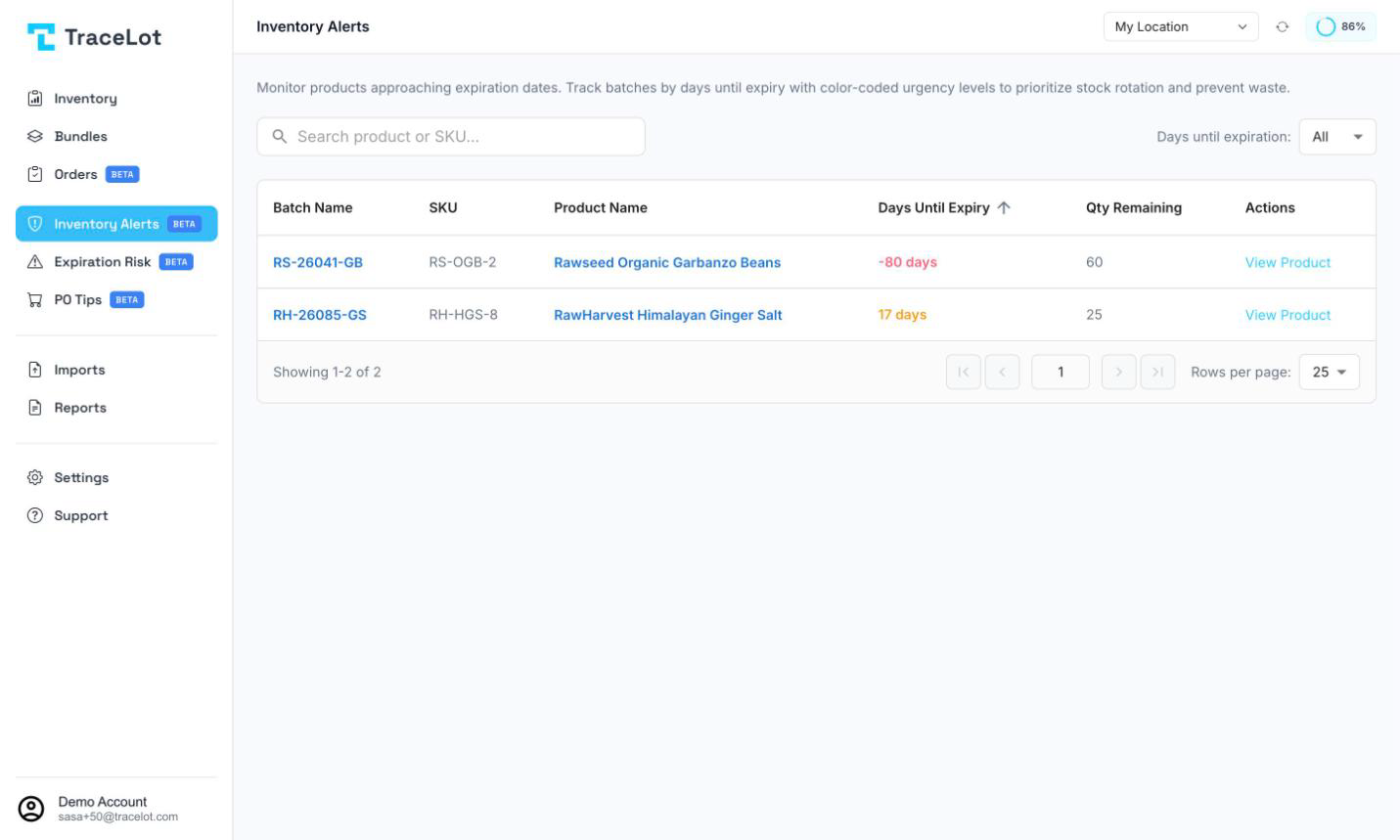
Stock Alerts (labeled Inventory Alerts in the sidebar) lists batches at a warehouse that still have stock remaining and are approaching their expiry date. It's a read-only monitoring list — use it to spot batches that need attention before they expire.
What triggers an alert
A batch appears on this page when both are true:
- It still has remaining quantity (units for a regular product, or weight for an on-demand product).
- Its expiry date falls within the Days until expiration window you've selected, counting from today.
There's no separate on/off setting for stock alerts — the page itself, filtered by the days window, is the alert.
The Stock Alerts page
Pick a warehouse first — the page is empty until one is selected. The table has these columns:
| Column | Shows |
|---|---|
| Batch Name | The batch code. Click it to open the batch page. |
| SKU | The variant SKU. |
| Product Name | Click it to open the batch page for that product. |
| Days Until Expiry | Days remaining, colored red at 7 days or fewer and amber at 30 or fewer. Sortable. |
| Qty Remaining | Remaining stock, in the batch's unit (pieces, or weight for on-demand products). Sortable. |
| Actions | View Product — opens the product. |
Search by product name or SKU with the search box above the table. Results page through the standard rows-per-page control below it.
Setting thresholds
The Days until expiration dropdown above the table is the threshold: All, 10 days, 30 days, 60 days, or 90 days. It applies only to what this page shows — it isn't a saved account setting, so you re-pick it each time you want a narrower or wider view. The dropdown starts on All, but in practice that still shows batches expiring within roughly the next 90 days rather than every future expiry — pick 90 days explicitly for the same result, or check further out with Expiration Risk instead.
Note
This page doesn't have an acknowledge or dismiss action — a batch drops off the list on its own once it's used up or falls outside the days window you've selected. To get emailed when stock is approaching expiry, turn on Expiration Alerts in Notifications settings.