
Inventory
Custom fields
Add one extra text field to every batch of a product — for plant passports, COA numbers, and similar per-batch details.
Updated 2026-09-03
A custom field is a single extra text field you can turn on for a product, so every batch of that product can carry one more piece of information beyond the built-in fields.
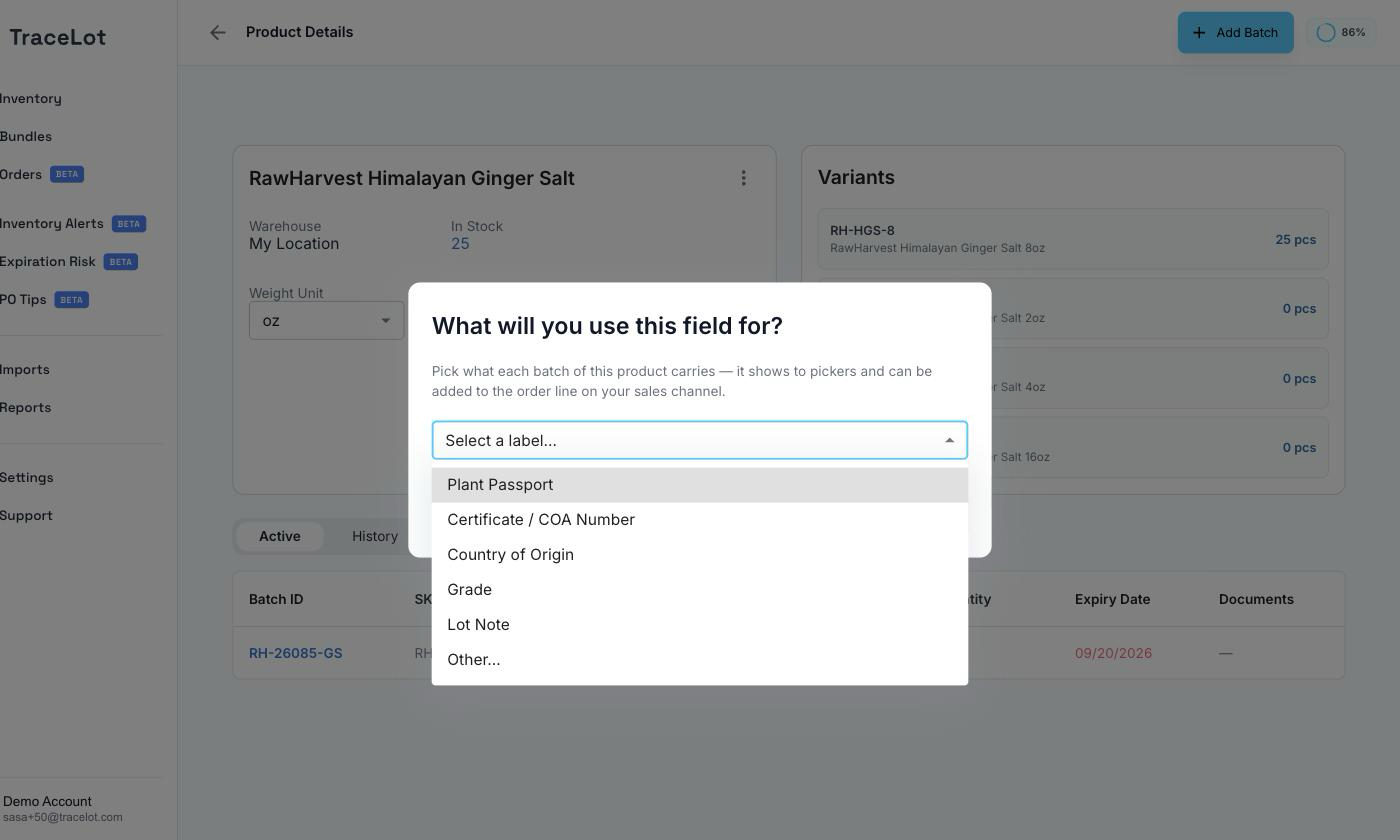
What they're for
Pick what each batch of a product should carry — it shows to pickers and can be added to the order line on your sales channel. The label picker offers these predefined options: Plant Passport, Certificate / COA Number, Country of Origin, Grade, and Lot Note — or choose Other… to type your own custom label.
Adding a field
- Open a product's page.
- Click the ⋮ menu and choose Configure Extra Field (it shows as Extra field: <label> once one is set).
- Pick a label from the list, or choose Other… and type a custom one.
- Click Save.
Once enabled, the field appears — using the label you chose — on the Add Batch form and on the batch Edit dialog for that product's batches, as an optional multi-line text field.
To turn it off, open Configure Extra Field again and click Disable Extra Field, then confirm. This stops collecting the field on new batches of the product; batches that already have a value keep it.
Where they appear
A batch's custom field value shows on that batch's General tab summary card, under the label you configured, whenever it has a value set.
Note
The packing slip PDF does not currently show a batch's custom field — it shows batch code, expiry, and quantity per allocation, but not this extra field.